<br />
<b>Warning</b>:  Declaration of WP_SimplePie_Blog_Item::get_id() should be compatible with SimplePie_Item::get_id($hash = false) in <b>/home/www/jpphoto.juliepdesign.com/wp-content/plugins/blogger-importer/blogger-importer-blogitem.php</b> on line <b>24</b><br />
<br />
<b>Warning</b>:  Declaration of WP_SimplePie_Blog_Item::get_links($linktypes) should be compatible with SimplePie_Item::get_links($rel = 'alternate') in <b>/home/www/jpphoto.juliepdesign.com/wp-content/plugins/blogger-importer/blogger-importer-blogitem.php</b> on line <b>24</b><br />
<br />
<b>Warning</b>:  Declaration of Blogger_Import_List_Table::prepare_items($blogs, $JSInit) should be compatible with WP_List_Table::prepare_items() in <b>/home/www/jpphoto.juliepdesign.com/wp-content/plugins/blogger-importer/blogger-importer-table.php</b> on line <b>14</b><br />
<?xml version="1.0" encoding="UTF-8"?><rss version="2.0"
	xmlns:content="http://purl.org/rss/1.0/modules/content/"
	xmlns:wfw="http://wellformedweb.org/CommentAPI/"
	xmlns:dc="http://purl.org/dc/elements/1.1/"
	xmlns:atom="http://www.w3.org/2005/Atom"
	xmlns:sy="http://purl.org/rss/1.0/modules/syndication/"
	xmlns:slash="http://purl.org/rss/1.0/modules/slash/"
	>

<channel>
	<title>JP Design &#187; Flexible Edits</title>
	<atom:link href="http://jpphoto.juliepdesign.com/category/photoshop/flexible-edits/feed" rel="self" type="application/rss+xml" />
	<link>http://jpphoto.juliepdesign.com</link>
	<description>JP Photography</description>
	<lastBuildDate>Sat, 31 Dec 2016 00:02:00 +0000</lastBuildDate>
	<language>en-US</language>
	<sy:updatePeriod>hourly</sy:updatePeriod>
	<sy:updateFrequency>1</sy:updateFrequency>
	<generator>https://wordpress.org/?v=4.1.41</generator>
	<item>
		<title>Flexible Edits</title>
		<link>http://jpphoto.juliepdesign.com/flexible-edits.html</link>
		<comments>http://jpphoto.juliepdesign.com/flexible-edits.html#comments</comments>
		<pubDate>Sun, 08 May 2011 06:52:00 +0000</pubDate>
		<dc:creator><![CDATA[jpeter99]]></dc:creator>
				<category><![CDATA[Blog]]></category>
		<category><![CDATA[Flexible Edits]]></category>
		<category><![CDATA[Photoshop]]></category>

		<guid isPermaLink="false">http://www.boredinrexburg.com/2011/05/07/flexible-edits/</guid>
		<description><![CDATA[Levels Original Adjustment Layer Date: 5-06-2011; Rexburg, Idaho; F-Stop: 5.7; Shutter Speed: 1/2700; Focal Length: 55.0mm; Model: Canon EOS REBEL T1i For this photo I purposely focused on a lot of light before I captured the shot, so it would show up darker and I could edit it in Photoshop.  I used a large aperture [&#8230;]]]></description>
				<content:encoded><![CDATA[<p><br/><br/><br/><br/></p>
<div class="separator" style="clear: both; text-align: center;"><a style="margin-left: 1em; margin-right: 1em;" href="http://1.bp.blogspot.com/-odH0bb5jSgU/TcWr_wnC22I/AAAAAAAAADI/ncaPWfqClz4/s1600/AdjustmentLayer.jpg"><img src="http://1.bp.blogspot.com/-odH0bb5jSgU/TcWr_wnC22I/AAAAAAAAADI/ncaPWfqClz4/s320/AdjustmentLayer.jpg" alt="" width="320" height="213" border="0" /></a></div>
<div class="separator" style="clear: both; text-align: center;"><span class="Apple-style-span" style="color: orange;">Levels</span></div>
<div class="separator" style="clear: both; text-align: center;"><a style="margin-left: 1em; margin-right: 1em;" href="http://2.bp.blogspot.com/-JS1fLoAMfw4/TcWs_L4k1aI/AAAAAAAAADY/9zo2aMl7aaQ/s1600/orignal.jpg"><img src="http://2.bp.blogspot.com/-JS1fLoAMfw4/TcWs_L4k1aI/AAAAAAAAADY/9zo2aMl7aaQ/s320/orignal.jpg" alt="" width="320" height="213" border="0" /></a></div>
<div style="text-align: center;"><span class="Apple-style-span" style="color: orange;">Original</span></div>
<div style="text-align: center;"></div>
<p><br/></p>
<div style="text-align: center;"><span class="Apple-style-span" style="color: orange;"><span class="Apple-style-span" style="font-size: x-large;">Adjustment Layer</span></span></div>
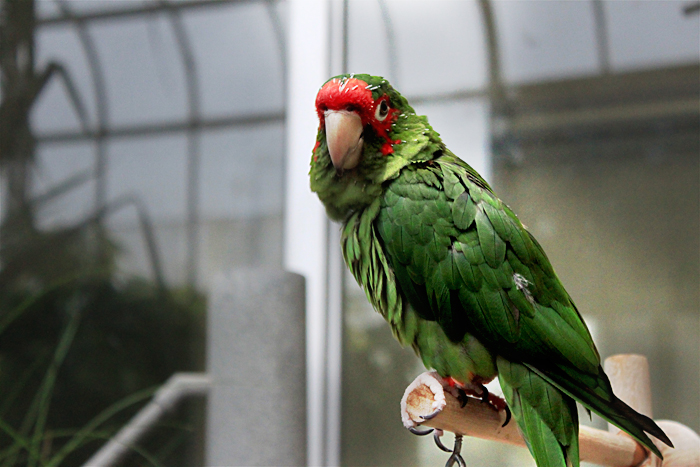
<div style="text-align: left;">Date: 5-06-2011; Rexburg, Idaho; F-Stop: 5.7; Shutter Speed: 1/2700; Focal Length: 55.0mm; Model: Canon EOS REBEL T1i</div>
<div style="text-align: left;"></div>
<p><br/></p>
<div style="text-align: left;">For this photo I purposely focused on a lot of light before I captured the shot, so it would show up darker and I could edit it in Photoshop.  I used a large aperture to put direct focus on the parrot and blur the background.  I brought this photo into Photoshop and used an adjustment layer (non destructive editing).  I used the Levels Tool and lightened the whole picture, added contrasts and lightened the midtones.  I really wanted the parrot to pop, so I decided to use the &#8220;free&#8221; mask to bring back the dark in the background.  I lowered to opacity so I would not make it as dark as the original was, but enough that parrot would pop.</div>
<p><br/><br/></p>
<div style="text-align: left;"></div>
<div class="separator" style="clear: both; text-align: center;"><a style="margin-left: 1em; margin-right: 1em;" href="http://4.bp.blogspot.com/-POrraSCBdYA/TcWsAcVZeTI/AAAAAAAAADM/SSk-U87bLvQ/s1600/Flowerback.jpg"><img src="http://4.bp.blogspot.com/-POrraSCBdYA/TcWsAcVZeTI/AAAAAAAAADM/SSk-U87bLvQ/s320/Flowerback.jpg" alt="" width="320" height="213" border="0" /></a></div>
<div style="text-align: center;"><span class="Apple-style-span" style="color: orange;">Crystilized</span></div>
<div class="separator" style="clear: both; text-align: center;"><a style="margin-left: 1em; margin-right: 1em;" href="http://4.bp.blogspot.com/-TO4xX1zQP68/TcWsFrSV9YI/AAAAAAAAADU/8iNeoU1QzkU/s1600/IMG_8397.jpg"><img src="http://4.bp.blogspot.com/-TO4xX1zQP68/TcWsFrSV9YI/AAAAAAAAADU/8iNeoU1QzkU/s320/IMG_8397.jpg" alt="" width="320" height="213" border="0" /></a></div>
<div class="separator" style="clear: both; text-align: center;"><span class="Apple-style-span" style="color: orange;">Original</span></div>
<div class="separator" style="clear: both; text-align: center;"><span class="Apple-style-span" style="color: orange;"><br />
</span></div>
<div class="separator" style="clear: both; text-align: center;"></div>
<div class="separator" style="clear: both; text-align: center;"><span class="Apple-style-span" style="color: orange;"><span class="Apple-style-span" style="font-size: x-large;">Smart Filter</span></span></div>
<div class="separator" style="clear: both; color: black; text-align: left;"><span class="Apple-style-span"><span class="Apple-style-span">Date: 5-06-2011; Rexburg, Idaho; F-Stop: 5.6; Shutter Speed: 1/1000; Focal Length: 55.0mm; Model: Canon EOS REBEL T1i</span></span></div>
<div class="separator" style="clear: both; color: black; text-align: left;"><span class="Apple-style-span"><span class="Apple-style-span"><br />
</span></span></div>
<div class="separator" style="clear: both; color: black; text-align: left;"><span class="Apple-style-span"><span class="Apple-style-span">I used a large aperture to put direct focus on the flowers and blur the background.  I brought this photo into Photoshop and used an adjustment layer, the Levels Tool.  I lightened the picture, added contrasts and darkened the midtones. I converted the photo to a smart object.  I applied a filter to the photo, the Crystalized filter.  I really wanted the flower in the middle to be sharp, so I decided to use the &#8220;free&#8221; mask to bring back the original photo, but just the flower in the front.  </span><span class="Apple-style-span">   </span></span></div>
<div style="min-height:33px;" class="really_simple_share really_simple_share_button robots-nocontent snap_nopreview"><div class="really_simple_share_facebook_like" style="width:100px;"><div class="fb-like" data-href="http://jpphoto.juliepdesign.com/flexible-edits.html" data-layout="button_count" data-width="100" ></div></div><div class="really_simple_share_twitter" style="width:100px;"><a href="https://twitter.com/share" class="twitter-share-button" data-count="horizontal"  data-text="Flexible Edits" data-url="http://jpphoto.juliepdesign.com/flexible-edits.html"  data-via=""   ></a></div><div class="really_simple_share_google1" style="width:80px;"><div class="g-plusone" data-size="medium" data-href="http://jpphoto.juliepdesign.com/flexible-edits.html" ></div></div><div class="really_simple_share_specificfeeds_follow" style="width:110px;"><a id="email_follow" href="#email_follow" onclick="var invite = new readygraph.framework.ui.Invite();invite.set('visible', true);return false;"><img src="http://jpphoto.juliepdesign.com/wp-content/plugins/really-simple-facebook-twitter-share-buttons/images/specificfeeds_follow.png" alt="Email, RSS" title="Email, RSS" /> Follow</a></div></div>
		<div class="really_simple_share_clearfix"></div><div class='shareaholic-canvas' data-app-id='6771661' data-app='share_buttons' data-title='Flexible Edits' data-link='http://jpphoto.juliepdesign.com/flexible-edits.html' data-summary=''></div>]]></content:encoded>
			<wfw:commentRss>http://jpphoto.juliepdesign.com/flexible-edits.html/feed</wfw:commentRss>
		<slash:comments>0</slash:comments>
		</item>
	</channel>
</rss>
